CMDK for Gmail

🚨 Simplehuman is now CMDK   |   New name. Same mission.  Read More.

Email icon for CMDK Gmail extension

Supercharge your Gmail

with read receipts, reminders, snippets, and more

with read receipts, reminders, snippets and more

Desktop computer icon
CMDK read receipts feature showing email open tracking in Gmail

25+ new hotkeys in Gmail

CMDK read receipts feature showing email open tracking in Gmail

Snooze and add reminders in natural language

CMDK read receipts feature showing email open tracking in Gmail

Nuke email spammers in 1 click

CMDK Gmail extension feature demo

25+ new hotkeys in Gmail

CMDK Gmail extension feature demo

Snooze and add reminders in natural language

CMDK Gmail extension feature demo

Declutter your inbox in 1 click

Trusted by professionals at

1
2
3
4
5
6
7
8
9
10
11
12
13
14
15
2-copy
1-copy
3-copy
4-copy
5-copy
6-copy
7-copy
8
9
10
11

Simple shortcuts to
take control over your inbox

without paying $30 a month! 😅

without paying $30 a month! 😅

Command Bar for emails –

⌘+K or Ctrl+K

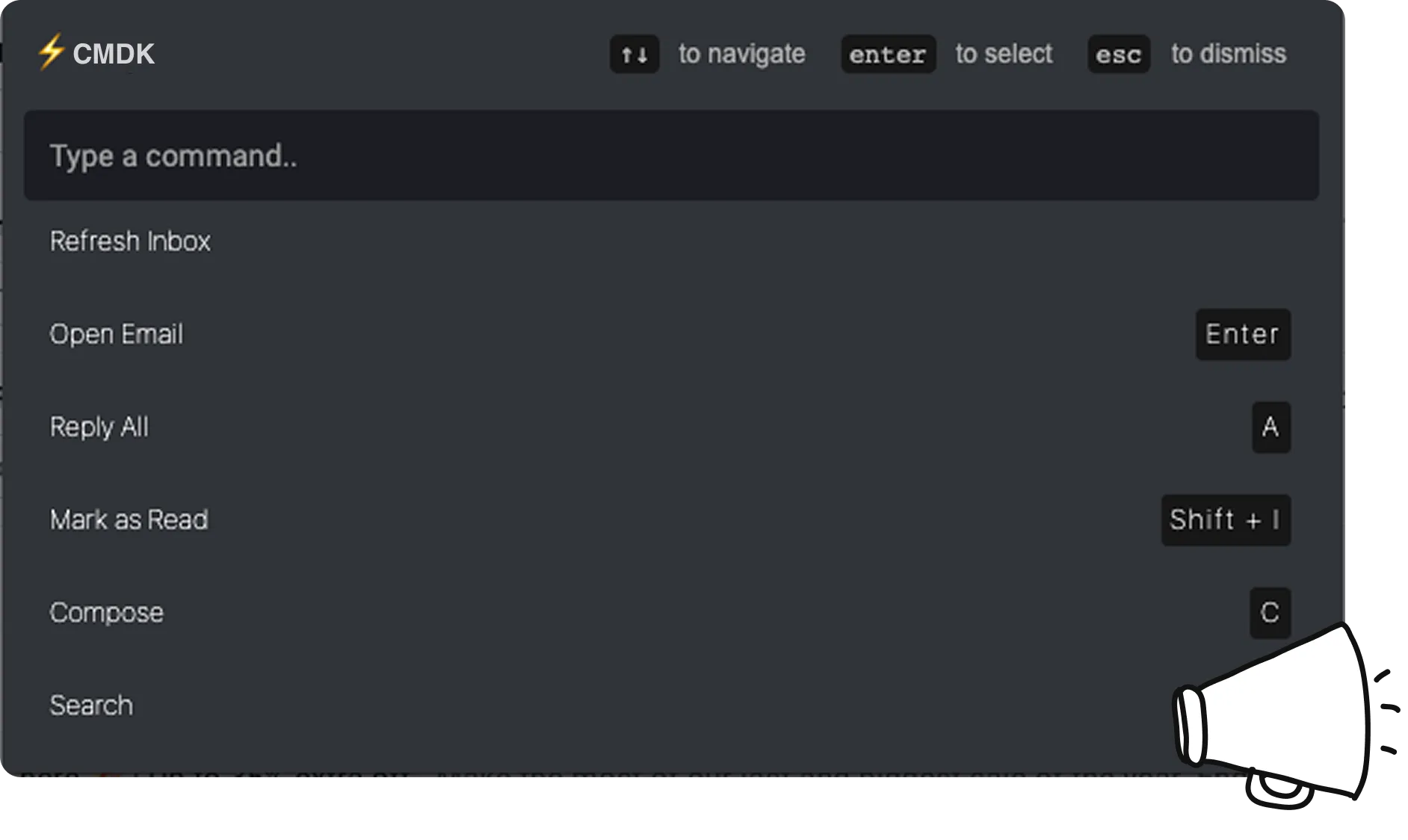
All your email actions – delete, archive, mark read/unread, label, compose etc available in an easy to use command bar.

You wouldn’t need to use your mouse again (mostly).

CMDK command bar in Gmail listing actions like reply all, mark as read, and compose with their keyboard shortcuts

Split your Inbox with Tabs

Create custom tabs of work, personal, or project emails to organize your inbox better. 

Use the Tab key to cycle between them. 

Wave icon for CMDK feature section

See emails when you need them

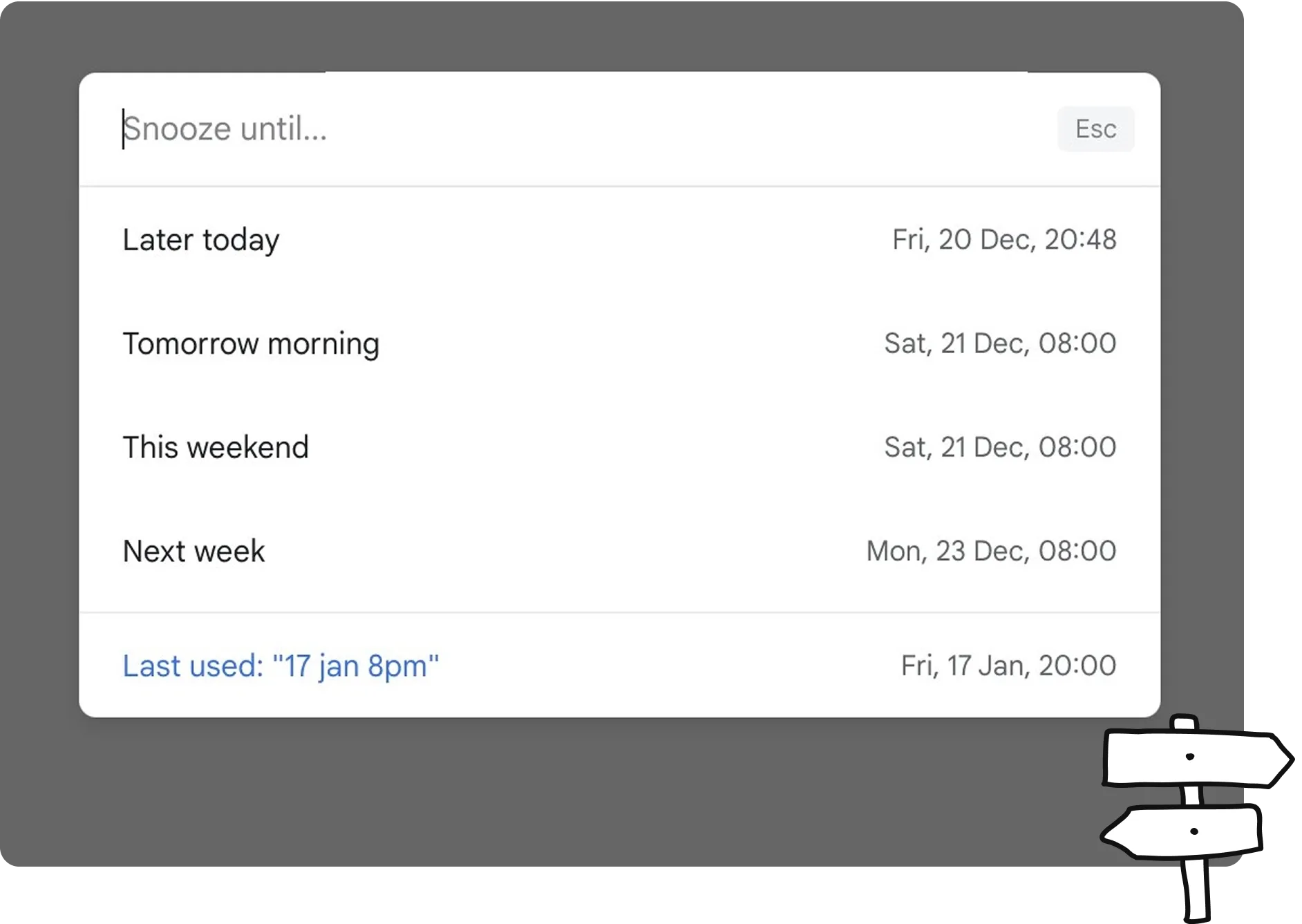
Hit B and describe when you want the email back just like telling a colleague “remind me about this next Monday”.

CMDK understands and handles the rest.

CMDK snooze menu in Gmail with natural language times like later today, tomorrow morning, and next week

Nuke spammers in one click

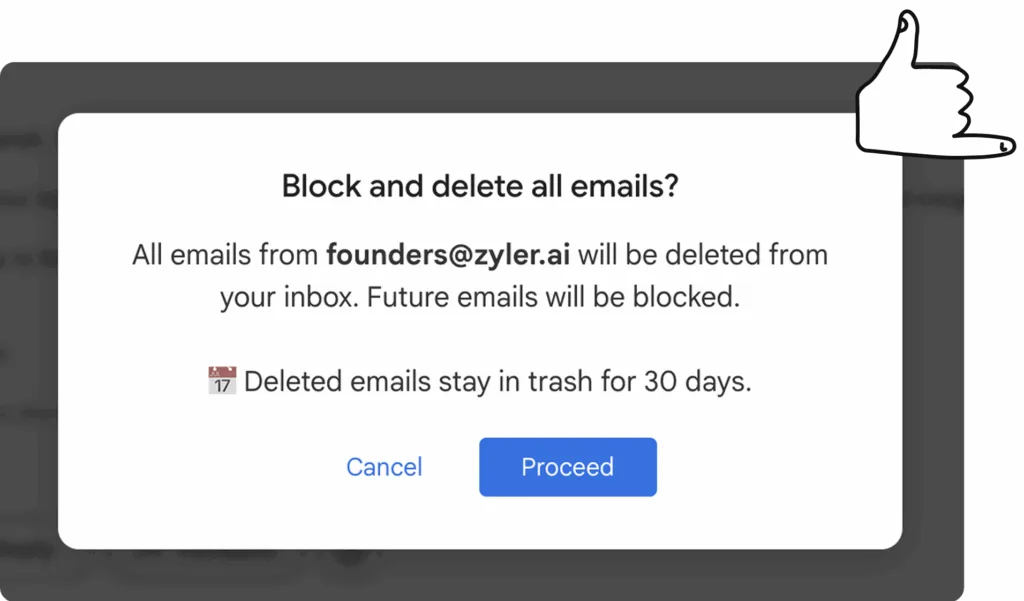
Block and delete pesky marketing emails by clicking on the 🚫 button in your toolbar.

Decluttering inboxes with thousands of unread emails is now a click.

CMDK block sender dialog in Gmail confirming block and delete all emails from a sender

Know when an email is opened

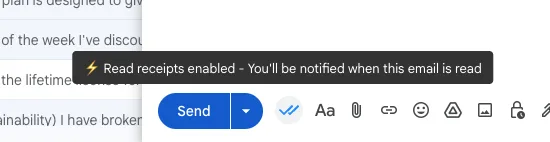
Read Receipts quietly track every open and re‑open of your sent emails, so you can see who engaged and viewed your message. 

Follow up at the perfect time instead of guessing. 

Gmail compose toolbar showing CMDK read receipts enabled notification
Navigation icon for CMDK feature section

Email Snippets 

Create reusable email templates with smart variables like {first_name} and {date+3d}. 

Type ; while composing to search and insert any snippet instantly.

Wave icon for CMDK feature section

Quick navigation through your email

Jumping between your Inbox, Sent, Labels, or Categories is now an easy to use command with CMDK.

Hit Esc  to go back to the previous screen from wherever you are.

Navigation icon for CMDK feature section

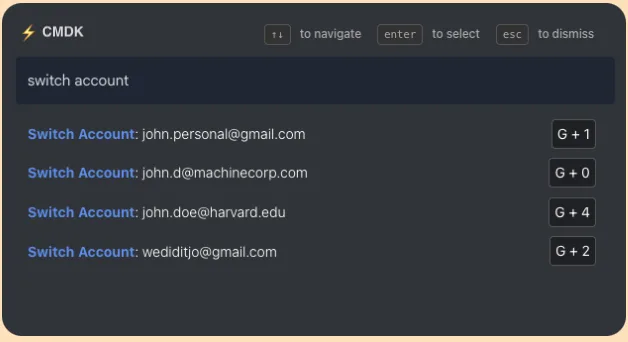
Hotkeys to switch Google accounts 

Switch between your different inboxes using the command bar or keyboard shortcuts. 

CMDK works across all your inboxes. No limits. 

Contact icon for CMDK support
CMDK switch account command in Gmail with G plus number shortcuts for each account

One click keyboard shortcuts
for everything

Archive or delete emails instantly with no need to select them first. Just hit E or Del and CMDK takes care of the rest.

Triage email at the speed of thought.

Navigation icon for CMDK feature section

Nudges to learn the hotkeys

Whenever you use your mouse, CMDK gently prompts you with the keyboard shortcut that you could have used instead.

The fastest way to use Gmail is with keyboard shortcuts. Migrate to using them at your own pace. 

CMDK keyboard shortcut tooltip in Gmail
Wave icon for CMDK feature section

Command Bar for emails –

⌘+K or Ctrl+K

All your email actions – delete, archive, mark read/unread, label, compose etc available in an easy to use command bar.

You wouldn’t need to use your mouse again (mostly).

CMDK command bar in Gmail listing actions like reply all, mark as read, and compose with their keyboard shortcuts

Split your Inbox with Tabs

Create custom tabs of work, personal, or project emails to organize your inbox better.

Use the  Tab Tab key to cycle between them. 

Wave icon for CMDK feature section

See emails when you need them

Just hit B and describe when you want the email back – as naturally as telling a colleague “remind me about this next Monday”.

CMDK understands and handles the rest.

CMDK snooze menu in Gmail with natural language times like later today, tomorrow morning, and next week

Nuke spammers in one click

Block and delete pesky marketing emails by clicking on the 🚫 button in your toolbar.

Decluttering inboxes with thousands of unread emails is now a click.

CMDK block sender dialog in Gmail confirming block and delete all emails from a sender

Know when an email is opened

Read Receipts quietly track every open and re‑open of your sent emails, so you can see who engaged and viewed your message. 

Follow up at the perfect time instead of guessing. 

Gmail compose toolbar showing CMDK read receipts enabled notification

Email Snippets

Create reusable email templates with smart variables like {first_name} and {date+3d}. 

Type ; while composing to search and insert any snippet instantly.

Wave icon for CMDK feature section

Quick navigation through your email

Jumping between your Inbox, Sent, Labels, or Categories is now an easy to use command with CMDK.

Hit Esc  to go back to the previous screen from wherever you are.

Navigation icon for CMDK feature section

Hotkeys to switch Google accounts

Switch between your different inboxes using the command bar or keyboard shortcuts. 

CMDK works across all your inboxes. No limits.

CMDK switch account command in Gmail with G plus number shortcuts for each account

One click keyboard shortcuts for everything

Archive or delete emails instantly with no need to select them first. Just hit E or Del and CMDK takes care of the rest.

Triage email at the speed of thought.

Navigation icon for CMDK feature section

Command Bar for emails –

⌘+K or Ctrl+K

All your email actions – delete, archive, mark read/unread, label, compose etc available in an easy to use command bar.

You wouldn’t need to use your mouse again (mostly).

CMDK command bar in Gmail listing actions like reply all, mark as read, and compose with their keyboard shortcuts

Split your Inbox with Tabs

Create custom tabs of work, personal, or project emails to organize your inbox better. 

Use the Tab key to cycle between them.

See emails when you need them

Hit B and describe when you want the email back just like telling a colleague “remind me about this next Monday”.

CMDK understands and handles the rest.

CMDK Chrome Web Store rating showing 4.9 out of 5 stars

Nuke spammers in one click

Block and delete pesky marketing emails by clicking on the 🚫 button in your toolbar.

Decluttering inboxes with thousands of unread emails is now a click.

Home

One click keyboard shortcuts for everything

Archive or delete emails instantly with no need to select them first. Just hit E or Del  and CMDK takes care of the rest.

Triage email at the speed of thought.

Know when an email is opened

Read Receipts quietly track every open and re‑open of your sent emails, so you can see who engaged and viewed your message.

Follow up at the perfect time instead of guessing.

Gmail compose toolbar showing CMDK read receipts enabled notification

Hotkeys to switch Google accounts

Switch between your different inboxes using the command bar or keyboard shortcuts. 

Works across all your inboxes.

CMDK switch account command in Gmail with G plus number shortcuts for each account

Quick navigation through your email

Jumping between your Inbox, Sent, Labels, or Categories is now an easy to use command with CMDK.

Hit Esc  to go back to the previous screen from wherever you are.

Email Snippets

Create reusable email templates with smart variables like {first_name} and {date+3d}. 

Type ; while composing to search and insert any snippet instantly.

Built to respect your privacy 🕵🏽‍♂️

CMDK does not read or store your emails. 
It works locally on your browser and is compatible with other Gmail extensions.

Wall of love

Loved by customers all across the world

Nice app. I like Gmail UI, but the shortcode options of Superhuman. So your app is the best of both worlds!

Brian Dainis, CMDK user
Brian Dainis
Literally the best email extension you could get. Amazing alternative to Superhuman. Super clean and just works. Definitely worth the price and they are super responsive to feedback.

Danny Nielsen, CMDK user
Danny Nielsen
Solid extension that provides many of the key benefits of MUCH pricier tools. Even better that this lives in Gmail, so you can use other extensions as well.

Home
Zachary Eisenstat
Great - simple as it says, but adds a bunch of convenient time saving features. I don't need a full on client, I just need my Gmail to be fast, and this does it.

Home
Dilip Goswami
Really good and helpful. And the developer was even very responsive to feedback!

Home
Dominic Roser
This is awesome. It massively speeds up and simplifies usage of Gmail. Great pricepoint too, and the developer is super active and amazing at feedback and improvements.

Brent Maxwell, CMDK user
Brent Maxwell
Love it! This extension helps me fly through my emails so I can get out of my inbox and back to revenue producing work. And great support!

Bill Brelsford, CMDK user
Bill Brelsford
Works like a charm! Exceptionally GREAT SUPPORT - even for as small language as Hungarian. It can totally replace Superhuman.

Home
Zoltán Szabó
I have started using CMDK as a layer over my gmail. Once I got used to it I love it. CMDK provide real-time support - most impressive!

Home
Chris Hallowes

Frequently Asked Questions

CMDK is a browser extension that sits inside your standard Gmail. It adds a Cmd+K (Ctrl+K) command bar, extra keyboard shortcuts, read receipts, snooze, snippets, and a split inbox. It is not a new email app, and there is nothing to migrate.

Gmail's shortcuts are real, and CMDK makes them better. Certain Gmail shortcuts are clunky or need multiple keystrokes (eg. select an email before archiving or deleting). CMDK converts these clunky steps into one-keystroke shortcuts. You get new navigation shortcuts, and CMDK teaches you these shortcuts as you use Gmail every day. The full native vs CMDK list is on the shortcuts cheat sheet.

People who live in Gmail and want to be faster at it. Founders, business owners, executives, VCs, lawyers, sales & support reps, and users from Superhuman and Shortwave. We have seen Superhuman users successfully move back to Gmail after using CMDK.

There is no mobile app yet, so if you mostly live in Gmail on your phone, CMDK will not help. It is also the wrong tool for shared team inboxes, cold-email sequences, or Outlook.

No. CMDK runs locally in your browser. It does not upload your email contents to our servers, and it does not put any new AI in your inbox. It only acts on Gmail when you trigger something (archive, snooze, send with a read receipt, and so on).

Yes. 15 days, every feature, no credit card. If you do not stay, you are not charged. Plans after the trial are on the pricing page.

Chrome, Edge, Brave, Opera, Arc, Dia, Comet, Atlas, Shift and other Chromium browsers. Firefox from Firefox Add-ons. Safari on Mac from the Mac App Store. Same features on each.

No limit. You can use CMDK with as many Gmail inboxes as you want, and switch between them with a shortcut or the command bar.

Install it and use Gmail as you already do. It is free for 15 days with all features included, and no limits. No credit card required and you can uninstall the extension in a minute. How to uninstall.

Have more questions? Contact Us ›

    
“Incredibly useful.”

    
“Gmail superpowers without the cost or opacity”

    
“This tool is elite!”

15 days free trial for everyone, no credit card needed.

4.9/5


From 1000+ happy customers

Simplehuman Logo Install CMDK

CMDK works on the desktop browser.Enter your email below, and we will send you a link to install CMDK when you are on your computer.