You get introduced over email all the time. A mutual contact loops you in with someone worth knowing, writes a line or two, and now the thread is yours to carry. There is a small etiquette to taking it forward: you reply to the new person, thank the person who made the intro, and move that introducer to BCC so they drop out of the back-and-forth without being cut off rudely.
Done by hand, that is four fiddly steps. Hit reply all, open the BCC field, drag the introducer out of To and into BCC, then type the thank-you line. CMDK does all of it with one keystroke.
What Instant Intro does
Instant Intro is built for exactly this moment: a thread where someone introduced you to one or more people, and you are ready to reply.
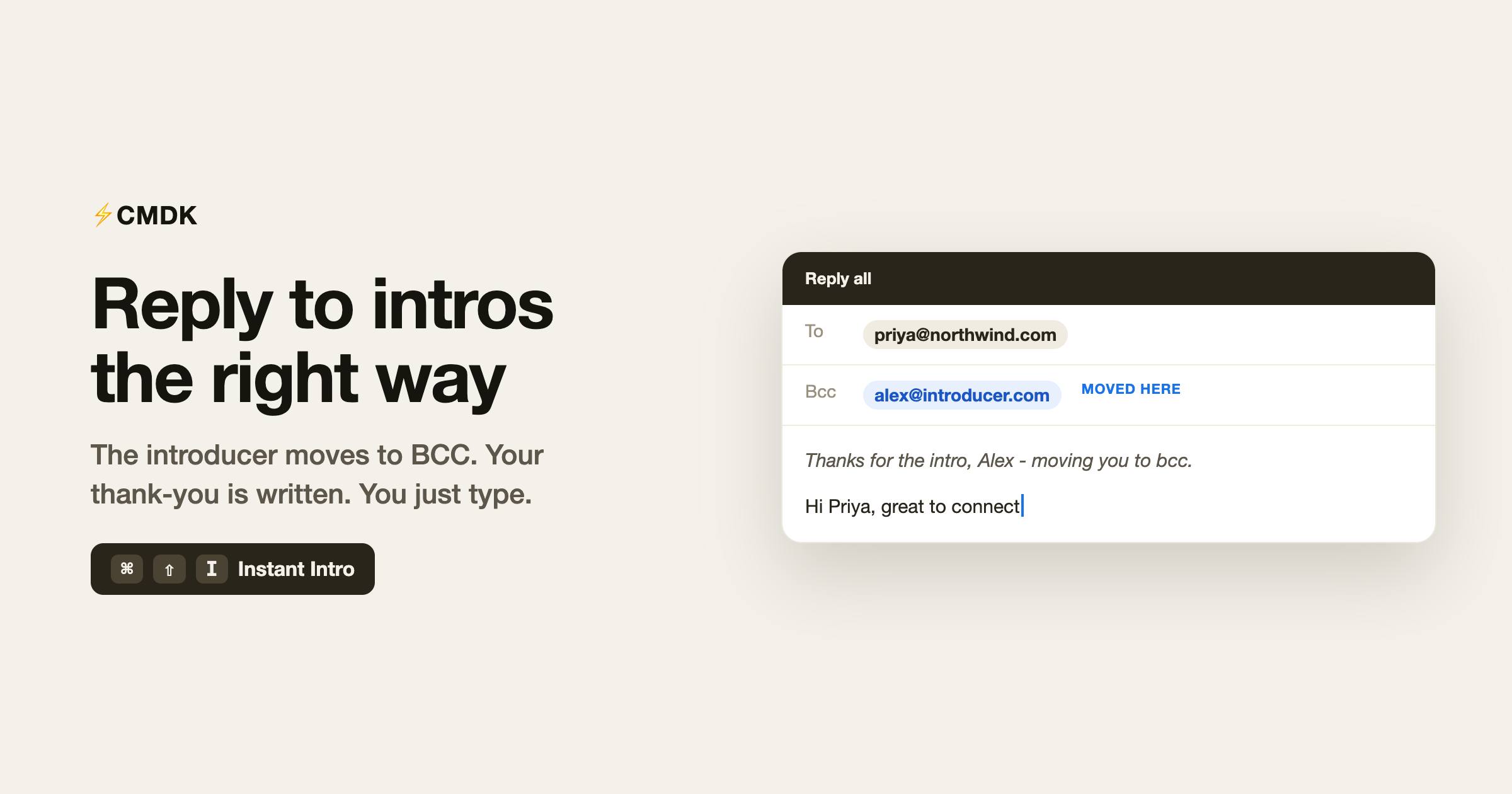
When you trigger it, CMDK:
- Opens a reply-all to the thread.
- Takes the introducer (the first person on the thread) and moves them to BCC.
- Keeps everyone you actually want to talk to in the To field.
- Drops in a short courtesy line, “Thanks for the intro, {name} – moving you to bcc,” with your cursor placed right after it so you can keep typing.
That is the whole intro-handling ritual, handled. You go straight to writing the message that matters.
How to use it
Open the intro email so you are reading the thread, not sitting in the inbox list. Then press:
- Mac:
Cmd + Shift + I - Windows:
Ctrl + Shift + I
The reply opens with the introducer already in BCC, the courtesy line already written, and your cursor ready. Finish your message and send.
Because it only runs while you are viewing an email, it never fires by accident from the inbox.
Why moving the introducer to BCC matters
Leaving the person who introduced you in the To field means they get every reply for the rest of the conversation. That is noise for them and a little awkward for you. Moving them to BCC on your first reply is the quiet signal that the intro worked: they see you followed up, and then they bow out of the thread.
It is the standard “double opt-in” courtesy, and skipping it is the kind of thing people notice. Instant Intro makes the polite version the easy version.
Where it helps most
- Founders and operators fielding investor, customer, and partner intros all week.
- Sales and BD who live on warm introductions and need to reply fast without looking sloppy.
- Recruiters moving candidate or hiring-manager intros forward.
- Anyone who gets connected to someone new and wants the first reply to land right.
A few common questions
What is the keyboard shortcut for Instant Intro?
Open the intro email and press Cmd + Shift + I on Mac or Ctrl + Shift + I on Windows. It works while you are reading the thread, not from the inbox list.
What exactly happens when I trigger it?
CMDK opens a reply-all, moves the person who introduced you to BCC, keeps the other recipients in To, and inserts a short thank-you line so you can start writing immediately.
Does it work if there is more than one person on the intro?
Yes. The first person on the thread (the introducer) moves to BCC and everyone else stays in the To field.
Can I edit the thank-you line?
Yes. It is dropped into the draft as normal text with your cursor next to it, so you can rewrite it or delete it before you send.
Is Instant Intro free?
Yes, Instant Intro is part of CMDK’s core feature set.
Take the intro forward in one keystroke
A warm introduction is worth replying to well. Instead of wrestling with the BCC field every time, let CMDK set the reply up the right way and get out of your way.
Install CMDK, open your next intro email, and press Cmd + Shift + I. The introducer moves to BCC, the thank-you is written, and you are already typing the part that counts.
Related reading
New to the move-to-BCC convention? Here is the full story on CC vs BCC and when to use each.