A good Gmail follow-up reminder brings a sent email back to your inbox at a time you choose, and only if nobody replied. Gmail can’t do that on its own. Its nudges pick emails for you, and you can’t put a reminder on a specific message.
So most people add an extension. We compared seven options on price, on what triggers the reminder, on whether you need an account, and on what each one says about storing your email.
Disclosure: we make two of the tools on this list, Snooze & Follow-up Reminders and CMDK. We describe the others from their own pricing and help pages, checked in November 2026.
Quick picks
- Follow-up reminders and snooze only, paid once: Snooze & Follow-up Reminders, $29 for life after 15 free days.
- Reminders plus a faster Gmail overall: CMDK, from $9 a month.
- Send later and reminders, with a small free plan: Boomerang.
- Follow-up emails sent for you on a schedule: Right Inbox.
- Reminders that work from any email app: FollowUpThen.
- Free, with nothing to install: Gmail’s nudges, if you accept that Google decides what comes back.
Comparison table
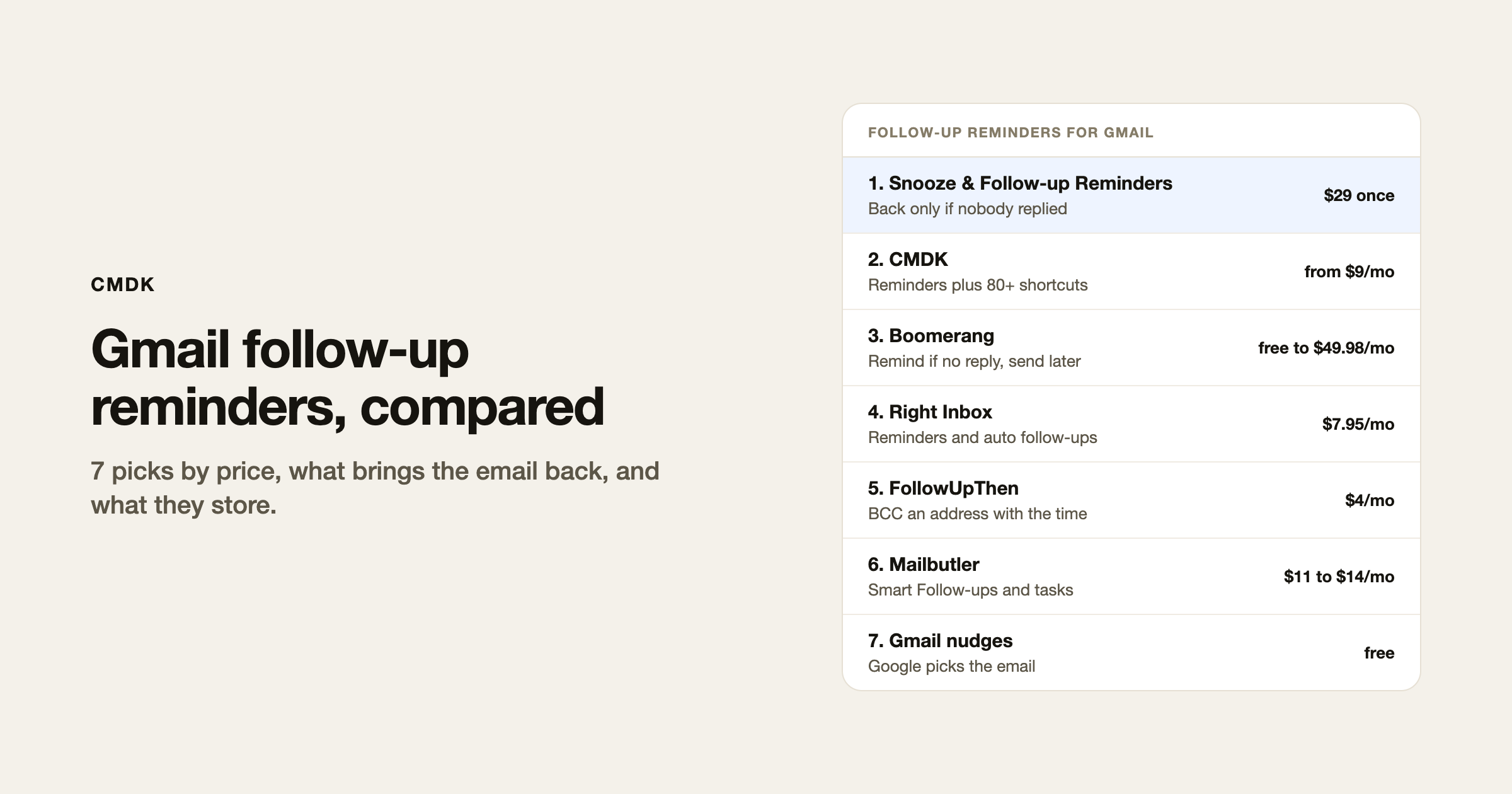
| Tool | Price | What triggers the reminder | Account needed | Stores your email on its servers? |
|---|---|---|---|---|
| Snooze & Follow-up Reminders | 15 days free, then $29 once | A time you type; returns only if nobody replied | None | No. It never stores or sends email content |
| CMDK | From $9/month, 15-day trial | A time you set in the compose window; returns if you don’t hear back | CMDK sign-in | No, it does not read or store email contents |
| Boomerang | Free (10 credits/month); paid from $4.98/month billed yearly | A time you pick; only if nobody replies, or always | Gmail access granted to Boomerang | No message bodies, per Boomerang; it keeps header details |
| Right Inbox | Free (5 reminders/month); $7.95/month billed yearly | A time you pick; Sequences send follow-ups if there’s no reply | Connects to your Gmail, per its privacy policy | Not stated |
| FollowUpThen | Free (50 active reminders/month); $4/month | A time written into an address you BCC | FollowUpThen account | Yes, by design: you send it the email. It says data is encrypted |
| Mailbutler | 14-day trial; Smart Follow-ups on the $11 to $14/user/month plan | Tracking data flags emails to chase; tasks remind you at a set time | Mailbutler account | Not stated on its pricing page |
| Gmail nudges | Free, built in | Google picks the email and the timing | None beyond Gmail | It is Gmail |
1. Snooze & Follow-up Reminders for Gmail
Snooze & Follow-up Reminders for Gmail does two jobs and nothing else. In a new email, click the clock and type when you want it back, like “friday” or “in 3 days”. If nobody has replied by then, the email returns to your inbox. If they reply first, the reminder is cancelled.
It also snoozes any email to a time you type. Press B (or click the clock) and write “tomorrow 9am” or “friday 2pm EST”. Gmail’s own snooze menu only offers a few presets and a date picker.
It’s built on Gmail’s own snooze. Snoozed emails still come back on time even if you remove the extension. There’s no account and no sign-in, and it never stores your emails or sends their content anywhere. It does send usage analytics and checks your license with our server.
What to know before you install:
- Chrome only for now, plus other browsers that install from the Chrome Web Store, like Brave. No Safari or Firefox version yet.
- Type times in English. The interface comes in 13 languages, but “tomorrow 9am” has to be written in English.
- Gmail’s keyboard shortcuts must be on, because it uses Gmail’s B shortcut. The extension offers to turn them on.
- One license covers one computer at a time. You can move it by pasting the code on the new one.
- It reminds you. It does not write or send the follow-up for you.
Price: 15 days free with no card, then $29 once for life. No subscription, and a 30-day refund. More on the Snooze page.
Best for: people who write their own follow-ups and want to pay once.
2. CMDK
CMDK is our full Gmail extension, and follow-up reminders are one feature of many. Flip the reminder toggle in the compose window before you send, and the email comes back if you don’t hear back. Snoozing to a typed time works the same way as in Snooze.
The rest is what you’d pick it for: 80+ keyboard shortcuts, a command bar on Cmd+K, read receipts, snippets you insert by typing ;, and split inbox tabs. Read receipts help decide when to chase. If they opened your email three times and didn’t answer, that’s a different follow-up from one they never opened.
CMDK runs in Chrome, Edge, Brave, Firefox and Safari, and does not read or store the contents of your emails. It needs a CMDK sign-in.
Price: from $9 a month or $79 a year, with a $169 lifetime option and a 15-day free trial. See current pricing.
Best for: people who live in Gmail and want reminders, read receipts and shortcuts in one extension.
3. Boomerang for Gmail
Boomerang is the long-standing pick for this job. When you send, you can ask it to bring the email back if nobody replies, or bring it back regardless. You can also schedule emails to send later, and pause new mail with Inbox Pause.
It asks for access to your Gmail account, because it moves and sends messages for you. Boomerang’s help center says it does not store message bodies in any form, only header details used to find the message.
The catch is price for work accounts. The free plan gives 10 message credits a month. Personal is $4.98 a month billed yearly, but it covers only gmail.com accounts. Google Workspace accounts start at Pro, $14.98 a month billed yearly. Premium is $49.98 a month.
Best for: people who also want send later and Inbox Pause. Our Boomerang review covers the rest.
4. Right Inbox
Right Inbox puts a reminder button at the top of Gmail. Pick a preset like “Tomorrow morning” or set an exact date, time and timezone, and the email resurfaces then. Its help page doesn’t describe a “only if nobody replies” option for reminders.
Its separate Sequences feature does the no-reply part differently: it sends follow-up emails for you until the contact replies. That suits sales outreach more than one-to-one email, where you’d rather write the nudge yourself.
It also does recurring emails, templates and email tracking.
Price: free for 5 emails a month per feature. Professional is $7.95 a month billed yearly ($95.40 a year), with unlimited reminders and Sequences.
Best for: people who schedule a lot and want automatic follow-ups. See CMDK vs Right Inbox for a closer look.
5. FollowUpThen
FollowUpThen isn’t an extension. You BCC an address with the time before the @, such as 3days@followupthen.com, and the email comes back to you then. Because it’s just an email address, it works from Gmail on your phone, Apple Mail, Outlook or anything else.
The trade-off follows from how it works: every email you want a reminder on goes to FollowUpThen’s servers. It says the data is encrypted and used only for its productivity features.
Price: free for 50 active reminders a month. Base is $4 a month for unlimited reminders and recurring ones. Team is $4 per user a month.
Best for: people who switch between email apps and devices.
6. Mailbutler
Mailbutler is a suite for Gmail, Outlook and Apple Mail: tracking, templates, notes, tasks, signatures and AI writing. Follow-ups come in two forms. Tasks let you attach a follow-up to an email with a reminder time. Smart Follow-ups use tracking data to flag emails that need a chase and can draft the follow-up with AI.
Price: 14-day trial with every feature. Smart Follow-ups need the Smart plan, $11 to $14 per user a month depending on billing. Tasks start on Professional, $7 to $9.
Best for: people who want tracking, tasks and AI drafts in one subscription, including outside Gmail.
7. Gmail nudges (built in)
Gmail already has a free option. Turn on “Suggest emails to follow up on” in Settings, then General, then Nudges. Gmail then moves some sent emails back to the top of your inbox with a line like “Sent 5 days ago. Follow up?”.
The limit is control. Google decides which emails get a nudge and when. You can’t put a reminder on one specific email, choose the day, or count on an important thread being picked. Use them as a backup to reminders you set yourself.
Best for: people who want something free with nothing to install.
How to pick
Answer three questions.
- Do you want to write the follow-up yourself, or have it sent for you? Writing it yourself suits clients, hiring and anything where tone matters. Pick a reminder tool: Snooze, CMDK or Boomerang. Sent-for-you suits outreach at volume. Pick Right Inbox Sequences or Mailbutler.
- Subscription or one payment? Snooze is $29 once. Everything else on this list, apart from Gmail’s nudges and CMDK’s lifetime plan, is monthly or yearly.
- Is a reminder all you want? If yes, a single-purpose tool is cheaper and simpler. If you also want read receipts, templates and shortcuts, one extension beats four.
When the reminder fires, you still need something to send. Our guide to writing a follow-up email after no response has templates for each stage. For reminders that aren’t about sent mail, like a bill or a task, see how to set reminders in Gmail. For extensions beyond reminders, see our best Chrome extensions for Gmail.
Frequently asked questions
Does Gmail have a follow-up reminder?
Only nudges. Turn on “Suggest emails to follow up on” under Settings, General, Nudges, and Gmail will bring back some unanswered sent emails after a few days. You can’t choose which email or when. For a reminder on a specific email, you need an extension or a service like FollowUpThen.
How do I get a reminder only if someone doesn’t reply in Gmail?
Use a tool that checks for a reply before the reminder fires. Snooze & Follow-up Reminders and CMDK bring the email back only if nobody replied, and Boomerang lets you choose “only if nobody replies”. Gmail’s snooze on its own brings the email back whether or not they answered.
Is there a free follow-up reminder for Gmail?
Gmail’s nudges are free with no limit, but Google picks the emails. Boomerang’s free plan gives 10 credits a month, Right Inbox’s gives 5 reminders, and FollowUpThen’s allows 50 active reminders. Snooze & Follow-up Reminders is free for 15 days, then $29 once.
Do follow-up reminder extensions read my email?
It depends on the tool. Snooze & Follow-up Reminders never stores or sends email content and needs no account. CMDK does not read or store email contents. Boomerang says it keeps header details, not message bodies. FollowUpThen receives the full email, because you send it there. Check each tool’s privacy page before you grant access to a work account.
Do these work on my phone?
You set reminders in a desktop browser with the extensions on this list. Snooze & Follow-up Reminders and CMDK use Gmail’s own snooze, so an email you set on desktop also comes back in the Gmail app on your phone. FollowUpThen works from any device since you set reminders by email, and Boomerang has its own mobile apps.
The short version
If you only want emails to come back when nobody replies, install Snooze & Follow-up Reminders. It’s free for 15 days, then $29 once. If you want reminders along with read receipts, snippets and 80+ keyboard shortcuts, try CMDK free for 15 days.